Design a Read-Only Role with Explicit Acceptance Cases
Define a read-only role with explicit record boundaries, export rules and acceptance tests that verify both allowed views and denied changes.
Leer en español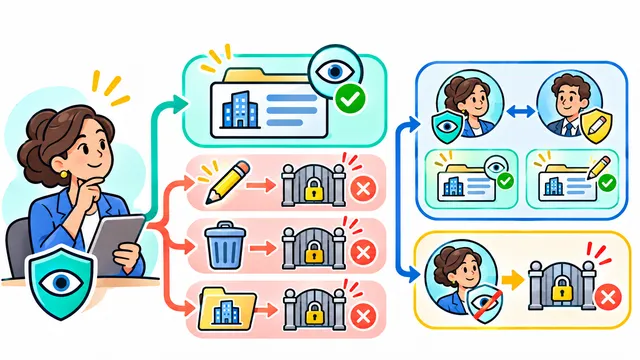


“Read-only” sounds precise until a reviewer can export every customer's records or approve a request through an old link. Before assigning the role, define which records the person may see and which actions remain forbidden. A hidden Edit button is only one part of that agreement.
The fictional exercise below gives a reviewer access to completed service reports for one branch. It is a proposed acceptance plan for an application you control, not a security assessment of a client system.
Write the permission boundary in business language
Start with a small matrix: resource, permitted records, visible fields and permitted action. For this example, the reviewer may read completed reports in Branch A, may not read Branch B reports, and may not change a report's status. Decide explicitly whether attachments and exports are included. An export copies information outside the interface even though it does not edit the source.
OWASP's authorization guidance recommends least privilege, denying access by default and checking permissions on every request. Use those principles to review both the ordinary screen and alternative routes to the same operation.
Prepare contrasting records and accounts
Create disposable reports A-23 and B-23 in separate branches, plus an unfinished Branch A report outside the reviewer's scope. Use a genuine test reviewer account with the proposed permissions, not an administrator pretending to be a reviewer. Keep a separate authorized editor account as a control.
Capture the initial status and values of each test record. Agree how to inspect stored changes and queued effects after a denied action. Logging an attempted action may be appropriate; changing the business record or scheduling a notification is not an acceptable side effect of a denial.
Test the allowed view and the denied actions
- Ordinary reading: the reviewer can open A-23 and sees only the approved fields and attachments.
- Direct navigation: a saved link to B-23 or the unfinished report does not expose its contents to the reviewer.
- Editing routes: an authorized tester checks documented update, approval and deletion requests using the reviewer account. The server denies prohibited actions and the stored records remain unchanged.
- Exports: if enabled, the export contains only permitted records and fields. If exports are excluded, both the visible control and the underlying operation enforce that decision.
- Positive control: the editor can perform the intended change in the test environment. This distinguishes a role-specific denial from a broken feature.
Check what happens when access changes
Remove the reviewer role while a report is open, then request another protected operation. Verify the agreed revocation behavior and how the interface explains the loss of access. Do not assume previously downloaded files can be recalled simply because the role was removed.
Repeat the relevant cases for mobile layouts and other supported clients. Screen differences should not create different business permissions. Keep error messages useful without revealing protected record details.
Approve a role with evidence, not a label
For each case, record the account role, resource, requested action, expected decision, observed response and resulting data state. Redact credentials and use fictional content. A screenshot of a missing button does not demonstrate that a direct request was rejected.
Keep this matrix alongside the role definition and revisit it when adding endpoints, fields, exports or integrations. Scope and effort depend on the existing authorization model, data boundaries and number of clients. Discuss a practical permission matrix and acceptance plan with Dynelink.
AI-generated conceptual illustration; not a client screenshot.