How to test whether your website contact form delivers usable inquiries
Test the full contact-form journey, from mobile submission to delivery, assignment and follow-up, so your team can spot missing or unusable inquiries.



A contact form is working only when a person can complete it, the request arrives with the information the business needs, and a responsible team member can respond. A “Thank you” message tests one part of that journey. It does not confirm delivery, assignment or follow-up.
For a service business, the form may be the bridge between a blog article, a service page and an actual conversation. The form can appear to work while a request is incomplete, misrouted or left unanswered. A controlled end-to-end test helps the team check each handoff.
Define what a usable inquiry looks like
Start with the information needed for an appropriate first response. A basic contact request may need a person's name, a reachable email or phone number, a short description of the need and any location or service detail that changes routing. A service request may need a preferred contact method or a way to identify an existing customer.
Ask the team that receives the inquiries which fields help them decide the next step. Remove questions they do not use. A field that feels useful to marketing can create friction for the visitor if it is unclear or asks for detail the visitor does not yet know.
Define success in operational terms:
the visitor understands what the form is for;
the required fields can be completed without guesswork;
validation explains how to correct an error;
the request is stored or delivered to the correct place;
the team can identify an owner and respond;
the visitor receives an appropriate confirmation.
Record the expected response process internally. Do not promise a response time on the page unless the team can consistently meet it.
Test the path from page to submission
Find the form and understand the promise
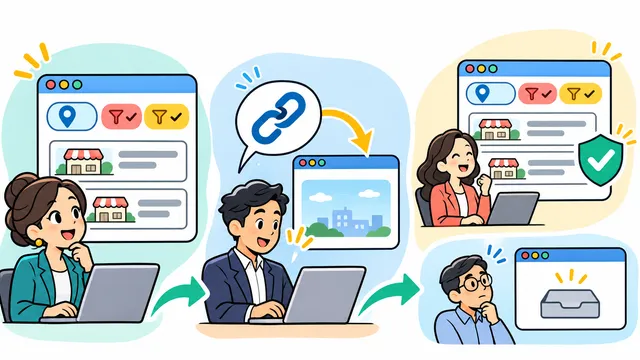
Begin from the pages where a potential customer actually starts: a service page, a relevant blog post and the site's navigation. Can a person find the contact action without interpreting an ambiguous label? Does the text describe what will happen after submission?
Check that the form matches the page. Someone reading about a software integration may be ready to describe existing systems, while a person on a general contact page may only have a broad question. The form should allow both without forcing an invented budget or technical specification.
Submit safely from multiple devices
Use a clearly labeled test inquiry, with controlled contact details approved for testing. Submit it from desktop and mobile, using normal browser conditions. Try a valid case and a few realistic error cases: a missing required field, an invalid email and a message long enough to represent a real request.
Observe whether the keyboard covers fields on mobile, whether error messages remain visible, whether the submit button is usable and whether the form prevents an accidental duplicate submission. If attachments are supported, test an allowed file type and size. Do not send sensitive customer information in test messages.
Test any consent or verification step as the visitor sees it. A security measure that blocks legitimate inquiries needs investigation, but removing controls without understanding why they exist can create another problem.
Verify delivery and ownership
The most important check happens after the browser reports success. Follow the test inquiry through every intended destination: email inbox, CRM, help desk or internal workflow.
Confirm:
The submission exists and has the expected timestamp.
Required fields retain their values and meaning.
Attachments or context arrive when the form promises them.
The request goes to the correct queue or person.
Notifications arrive without exposing unnecessary private information.
The team can see whether the inquiry is new, assigned, answered or closed.
If the form uses an integration, check what happens when that integration is unavailable. Does the request remain safely recorded for review, or is it lost after a success message? The answer depends on the site's implementation and needs a real test.
Identify an owner for the form and its destinations. If alerts go to one personal inbox, the business needs a process for absences, role changes and access removal.
Check the response and fallback path
Have the assigned team member respond to the test as they would to a real inquiry. Can they understand the request and contact the person without searching another system? Is there enough context to avoid asking the visitor to repeat everything?
Check the confirmation message too. It should set a realistic expectation and offer a suitable alternative, such as the published phone number or email, if the matter is urgent or the form does not fit the request. Verify those alternatives from a mobile device.
If an inquiry cannot be delivered, define who notices, how they are alerted and how the original submission is recovered. A fallback is only useful if it is documented and periodically exercised.
Measure failures without confusing them with demand
Track a small number of clearly defined events: visits to the contact page, form starts if available, successful submissions, delivery failures, assigned requests and completed responses. Compare them only when the measurement setup is known and stable.
A drop between page visits and submissions can indicate friction, but it can also mean that visitors were not ready to contact. A low inquiry count can reflect search intent, content, audience, seasonality or tracking gaps. Investigate the experience before declaring that a design change caused the result.
Where permitted, connect source pages or campaign links to the inquiry record. Keep the data you collect proportionate to the business need and follow the site's applicable privacy practices. Search Console impressions, social views and contact requests are different measurements; none should be presented as a direct conversion path without supporting records.
Create a repeatable contact-form test
Retest after meaningful changes to the website, form provider, CRM, spam protection, email routing or team ownership. A compact test record can include:
date, tester and device;
starting page and form version;
test scenario and expected destination;
whether validation and confirmation behaved as expected;
where the inquiry arrived and who owned it;
whether a response was possible;
defects found, owner and retest date.
Keep the record free of live customer details unless there is a clear business reason and proper handling. The purpose is to know whether the path still works, not to accumulate sensitive samples.
Example: a service request with an attachment
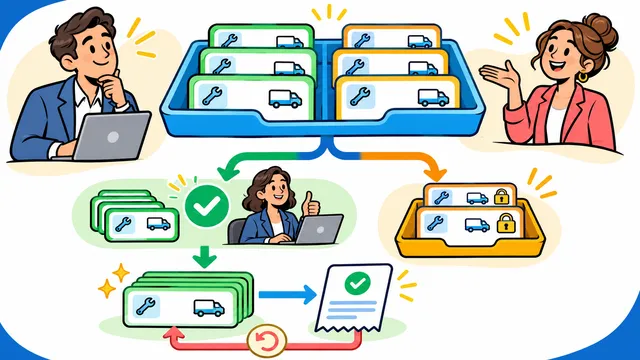
Imagine a repair business whose website lets customers send a photo with a service request. A test from a phone shows a confirmation message, but the operations team receives only the text and cannot open the image. The team also finds that the message lands in a shared inbox without an assigned owner.
The next actions are specific: check attachment handling, clarify which queue receives the request, assign ownership and repeat the mobile test. The example is hypothetical; it does not describe a Dynelink client or guarantee a particular outcome.
How Dynelink can help
Dynelink can review the path from a website page to a usable inquiry, including UX, form behavior, integrations, routing and the information a team needs for follow-up. That review can show whether the next improvement belongs in the page, the form or the internal process.
If you want to test your website's contact path end to end, email [email protected], call +1 813 501 0799 or visit www.dynelink.com.
Contact Dynelink to review whether your website turns a completed form into a request your team can actually handle.