Test a Mobile App Update with a Pending Local Draft
Test a supported mobile app upgrade using an existing local draft, recorded values, attachments and a controlled submission before approving release.
Leer en español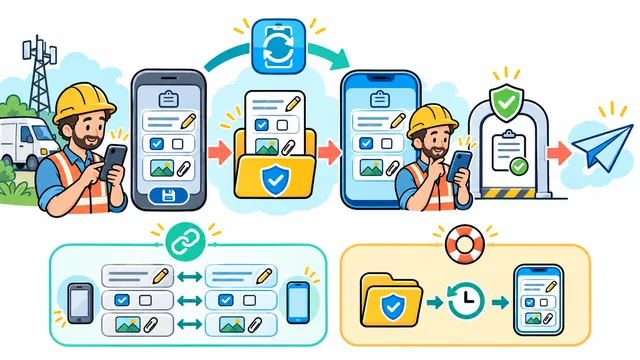
A mobile app update may work on a clean installation while an existing user cannot reopen an unfinished form. A useful release check starts with work saved by the older app and follows it through the supported update path.
This is a proposed acceptance exercise for a fictional field-service draft. It is not a report of a client test or a guarantee that every update preserves data. The business and development team should approve which drafts must survive, which app versions are supported and what recovery means before testing.
Define the draft and the version boundary
In the example, a technician has saved a local draft containing a site reference, a note, an unfinished selection and a test attachment. The draft has not been submitted. The next app version adds a required field and changes how one selection is stored.
Write down the installed app build, target build, device platform and relevant local data version. Separate an app version from a storage version: a release may change screens without changing stored data, or change both. Choose the actual supported starting versions, including an older supported version when users can skip releases.
Create evidence before installing the update
- Create the draft in the older app using synthetic, non-sensitive data.
- Save its identifier and expected values, including deliberately blank fields.
- Record whether the attachment is stored locally, uploaded or still pending.
- Close and reopen that version to confirm the saved draft exists before the update.
- Record the signed-in account and keep the authorized user context consistent.
Use an update process that retains the existing app data. A fresh installation can be a separate check, but it cannot establish whether an old draft survived. If the test setup clears storage, mark the upgrade test invalid and reconstruct the fixture.
Inspect the draft after the update
Open the updated app, locate the same draft and compare each recorded value. Check that missing data remains visibly unresolved: a new required field should follow the approved handling rule rather than silently taking an invented business value. Confirm that the user can understand what still needs attention.
For apps using Room, Android's migration documentation explains why existing on-device data must be considered when the database schema changes. It supports automatic and manual migration paths and recommends testing them. Those database checks belong alongside the user-facing draft check; opening the database alone does not show that a form displays and uses its values correctly.
Continue the work through one controlled submission
In a test environment, complete the new field, review the attachment and submit the draft once. Confirm the resulting server record, its identity and its values. Reopen the app to check that the completed draft does not appear as a second pending task. If submission fails, verify that the app reports the real outcome and retains the work required by the approved recovery policy.
Also exercise the defined offline behavior if the product supports it. Record whether the update can open the draft offline and what must wait for connectivity. Keep this separate from conflicts between two devices: this exercise concerns compatibility between an older saved draft and a newer app.
Make recovery a release decision
Agree on a safe test for an unreadable or unsupported draft. The app should expose a useful recovery path and avoid silently treating lost work as an empty form. Do not assume that reinstalling an older app can read data already changed by a newer version; include any proposed downgrade in a separately supported and tested plan.
Keep the source and target builds, before-and-after values, submission evidence, limitations and reviewer together. Block approval when a required value disappears, an attachment becomes inaccessible or the observed outcome cannot be reconciled. The resulting record supports a decision about the tested update paths, not every possible device or stored draft.
Contact Dynelink to discuss mobile update requirements and acceptance checks for unfinished work.
AI-generated conceptual illustration; not a client screenshot.