Plan TLS Certificate Renewals Before Lifetimes Get Shorter
Prepare website, portal and API certificates for shorter TLS lifetimes: inventory, automated renewal, a verified rehearsal and independent expiry monitoring.
Leer en español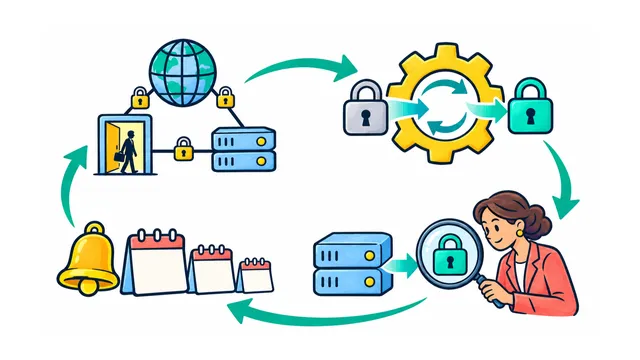


The HTTPS certificate behind a business website, client portal or API used to need attention roughly once a year. That interval is getting much shorter. If a renewal still depends on someone remembering a date, now is the time to make it a tested, repeatable routine.
What is changing and when
The CA/Browser Forum Baseline Requirements set the maximum validity of publicly trusted TLS certificates. Under the current version, certificates issued from March 15, 2026 can be valid for at most 200 days. The limit drops to 100 days on March 15, 2027 and to 47 days on March 15, 2029. See the Baseline Requirements and the ballot that introduced the schedule.
Certificate authorities can issue shorter certificates than the maximum. Let’s Encrypt has announced that its default certificates will move to 64 days on February 10, 2027 and to 45 days on February 16, 2028. It recommends renewing about two-thirds of the way through a certificate’s lifetime, warns that a fixed 60-day renewal interval will no longer be enough, and suggests ACME Renewal Information (ARI) where the client supports it. See Let’s Encrypt’s announcement.
List every certificate you depend on
Start with an inventory rather than a single domain. For each public hostname, record:
- the hostname and what it serves, such as the main website, a client portal, an API or a booking page;
- the issuing certificate authority and the expiry date of the certificate currently served;
- where the certificate is installed, such as a hosting panel, a load balancer, a CDN or a server you manage;
- how renewal happens and who owns it, including any step that still requires a person;
- how the renewed certificate reaches the server, and whether a service must reload to use it.
Some platforms renew and install certificates for you. Note that too, along with how you would confirm it. A hostname without an owner is the first item to fix.
Automate the renewal and the installation
Renewal only helps if the new certificate is actually served. For each entry, confirm that the same automated job requests the certificate, installs it where traffic arrives and reloads the service if needed. Avoid schedules based on a fixed number of days. Base the timing on the certificate’s own lifetime, or on ARI if your tooling supports it, so the routine keeps working as lifetimes shrink.
Rehearse a renewal and check what visitors receive
Run a renewal in a staging or test environment before relying on it in production. After the run, connect to the public hostname and compare the expiry date and certificate details with what the job reported. A renewal log that says “success” is not the same as visitors receiving the new certificate.
Also test one failure on purpose, such as a blocked validation request in the test environment. Confirm that the job reports the failure and that the right person is told.
Monitor expiry independently
Do not rely only on reminders from the issuer. Let’s Encrypt, for example, stopped sending expiration emails on June 4, 2025. Use a monitor that checks the certificate each hostname actually serves and alerts well before expiry, with enough time to fix a failed renewal by hand.
Review the inventory whenever a hostname, hosting provider or CDN changes, and repeat the rehearsal after any change to the renewal job.
Contact Dynelink to review your certificate inventory and renewal routine as part of website and application maintenance.
AI-generated conceptual illustration; not a client screenshot.